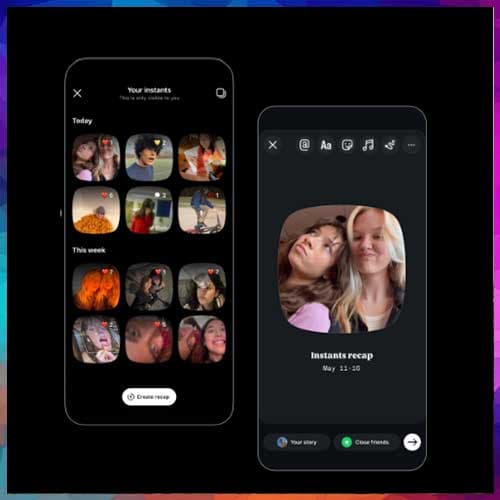
The Meta-owned Instagram announced Instants, a tool that lets users send a batch of snaps to Close Friends or mutual followers. The photos cannot be edited, but users can add captions. Instants will disappear after being viewed or after 24 hours. In this capacity, the feature sounds exactly like Instagram's existing disappearing messages. Plus, there's an undo button if the user wants to take back a sent photo. Instants will appear in Instagram DMs inbox appearing like a pile of photos.
Meta is deploying Instants both as a built-in Instagram feature and as a standalone app, a move that allows it to integrate with its main user base while experimenting in niche markets. This mirrors past strategies like Instagram Stories, which successfully challenged Snapchat. The standalone app, available in select countries, aims to compete directly with Snapchat and BeReal by prioritizing speed and authenticity.
All of Instagram’s existing safety tools will extend to Instants, including blocking, muting, and restricted sharing. Screenshots and screen recordings are disabled, and supervised teen accounts carry over time limits, sleep mode, and parental notifications for downloads. These measures aim to safeguard privacy while encouraging spontaneous sharing.
Meta details five ways to use the new Instants feature and app -
· Go to your Instagram inbox and tap the mini stack of photos at the bottom right corner.
· You can add a caption (unlike stories, you add the caption first!), but can’t further edit instants.
· Choose who to share your instants with – Close Friends or followers you follow back. Your friends can react, reply, and share instants as well.
· Tap the white button below the camera to share as many times as you want. An undo button will automatically appear the moment you share an instant in case you want to quickly take it back before it gets shared with friends.
· Instants you share will show up as a stack of photos in the bottom right corner of your friends’ inboxes, and disappear after viewed.